
 Nadya Dudka
  Andrew Dyuzhov
 This guide compares eight OpenClaw alternatives for people who use OpenClaw as a personal assistant with chat channels and skills: Atomic Agent, Hermes Agent, NanoClaw, ZeroClaw, Nanobot, Moltis, IronClaw and PicoClaw. If you are looking for an OpenClaw alternative, the hard part is usually leaving: your chat history, cron jobs, skills, memory and channel bots. So for each tool we checked what it can actually import from OpenClaw, how it runs local models, which channels it supports, how it gates risky actions and what it reports home.
We build Atomic Agent, so it sits first. Every claim about it is checked against its code at v0.6.5, including its weak spots. Everything else was checked on September 29, 2026.
Quick answer: which OpenClaw alternative should you pick?
Pick by the one thing you need most. Hermes Agent for the biggest community and the deepest migration. NanoClaw or Moltis for container isolation. Atomic Agent for approvals, a managed local model and a small channel set. PicoClaw for tiny hardware. Keep OpenClaw if you depend on its channel breadth.
| If you need | Pick | Why |
|---|---|---|
| Biggest ecosystem plus a real migration | Hermes Agent | 249,835 stars, hermes claw migrate imports memories, skills, messaging settings and allowlisted keys |
| Strongest isolation | NanoClaw or Moltis | Commands run in containers by default |
| Approvals on every gated action, local-first, Telegram and Discord | Atomic Agent (ours) | Five-level approval ladder, managed llama.cpp, imports OpenClaw chat history and cron jobs |
| Everything moved in one command | Moltis | Imports keys, skills, memory, sessions, MCP servers and channel config |
| Most channels in one binary | ZeroClaw | 30+ channels, supervised autonomy by default |
| Tiny hardware | PicoClaw | Go binary that claims under 10MB RAM, with a pre-1.0 security warning |
For a wider list of agents that run on local models, see our sister project’s roundup of the best local AI agents.
Why people leave OpenClaw
Most people leave OpenClaw over three things: a security record that includes a one-click remote code execution bug and a poisoned skill marketplace, a change in April 2026 that stopped Claude subscriptions from covering OpenClaw usage, and setup that takes hours to do safely. OpenClaw itself is healthy: 390,749 stars and a release on September 23, 2026.
Security. CVE-2026-25253, published February 1, 2026, let a crafted link make OpenClaw open a WebSocket to an attacker’s server and send its gateway token. MITRE, which assigned the CVE, scored it CVSS 3.1 8.8 (High). OpenClaw’s advisory calls it a 1-Click RCE and fixed it in version 2026.1.29.
The skill marketplace had its own incident. Koi Security’s ClawHavoc report, covered by The Hacker News, audited 2,857 ClawHub skills and found 341 malicious ones, 335 of them from a single campaign. Koi’s February 16 update raised the count to 824 malicious skills out of 10,700+. Unit 42 later found five malicious skills that slipped past ClawHub’s VirusTotal and ClawScan screening between February and May 2026.
Exposure made it worse. SecurityScorecard’s STRIKE team counted 40,214 internet-exposed OpenClaw instances in February 2026, and Bitsight separately reported more than 30,000 between January 27 and February 8. OpenClaw’s README still says “Tools run on the host for the main session unless you configure sandboxing.”
Cost. On April 4, 2026, Anthropic stopped Claude subscription limits from covering third-party harnesses, starting with OpenClaw, and moved that usage to pay-as-you-go extra usage. You could still use Claude through extra usage or an API key, and Anthropic’s help page on logging in points third-party tools to API-key auth. For people who ran OpenClaw on a flat subscription, the cost model changed.
Setup. Competing lists and threads in r/openclaw describe the same pain: a Node runtime, provider keys, per-channel configuration and gateway tokens, then hours of hardening before you would expose it. Several alternatives below pitch themselves on being smaller: Nanobot calls itself ultra-lightweight, and PicoClaw targets $10 boards.
How we checked these OpenClaw alternatives
We used primary sources only: each project’s GitHub repo, release page, README and official docs. Releases and stars were read from the GitHub API on September 29, 2026. A tool had to have a release within 90 days, after July 1, 2026, and target the same job as OpenClaw: a personal agent with chat channels and skills.
Several tools other lists still recommend failed the liveness rule: NullClaw (last release May 29, 2026), memU (March 23), OpenFang (May 12) and TrustClaw (no releases). Coding agents such as Claude Code and OpenCode are a different job, and we cover them in Claude Code alternatives that are still alive.
What we did not do: we did not benchmark these agents or run them side by side on tasks. The only things we executed were Atomic Agent’s own: its OpenClaw import in dry-run mode, on sample OpenClaw data, and one approval prompt. Everything else on each card comes from the project’s documentation and code, with links so you can check it. Where a project documents nothing on a topic, we write that we found no statement.
The 8 OpenClaw alternatives, reviewed
Every card covers the same fields: what the project is, what it imports from OpenClaw, local models, channels, security and approvals, and telemetry. The Note is the caveat we would want to know before switching, and the Verdict says who should pick it.
1. Atomic Agent: best for approvals and local models on a small channel set
We build Atomic Agent, so read this card with that in mind and check it against the repo.
Atomic Agent is a local-first agent runtime under the MIT license. It works in the terminal, keeps memory across sessions, runs scheduled tasks and can be reached from Telegram or Discord. Latest release: v0.6.5 on September 24, 2026. Stars: 2,519, which makes it the smallest project on this list.
- OpenClaw import:
atomic-agent import openclaw --dry-runpreviews, andatomic-agent import openclaw --agent main --yesapplies. It brings over chat history (user and assistant turns, reasoning, tool calls and results) and scheduled jobs from OpenClaw’s cron table, including cron expressions, intervals and future one-shot runs. Disabled jobs, empty prompts and past one-shots are skipped with a reason. The same import is available as/importin the TUI and on first run when OpenClaw data is detected. The import guide lists every flag. - What it does not import: API keys and
openclaw.jsonconfig (left out on purpose), channel bindings, skills, memory and workspace files, and MCP servers. You set those up again. - Local models: the CLI downloads and runs llama.cpp and the model for you, with a catalog of 13 chat models from 4B-class models (8 GB RAM recommended) up to 35B-class models. Context size is set automatically from free VRAM. Presets cover Ollama, LM Studio and Atomic Chat, and cloud providers include OpenRouter and any OpenAI-compatible endpoint. If a cloud provider fails, it falls back to an installed local model.
- Channels: Telegram and Discord, plus several bots on one runtime.
atomic-agent servekeeps them running headless. - Security and approvals: five approval levels, and the default is level 1, where every gated action asks. You approve from the terminal or with buttons in Telegram and Discord. MCP tools sit under the same gate by default, and hardline shell rules block the worst commands at every level. Skills use the
SKILL.mdformat, ClawHub is built in, and each ClawHub install runs two scans: ClawHub’s own verdict and a local scanner for exfiltration, destructive commands and prompt injection. Commands run on your machine after approval; it is not a sandbox. - Telemetry: on by default. Anonymous usage metrics go to PostHog and error reports to Sentry, with no message content. One switch turns both off:
/privacy analytics offin the TUI, the toggle on the Privacy tab, oranalytics.enabled: falsein~/.atomic-agent/config.json. It applies live, without a restart.
Note: channels are its weakest point next to OpenClaw. There is no WhatsApp, Signal, iMessage or Slack channel. OpenClaw skills are not guaranteed to work unchanged either: OpenClaw-specific frontmatter is ignored, and skills that call OpenClaw-only tools will not find them.
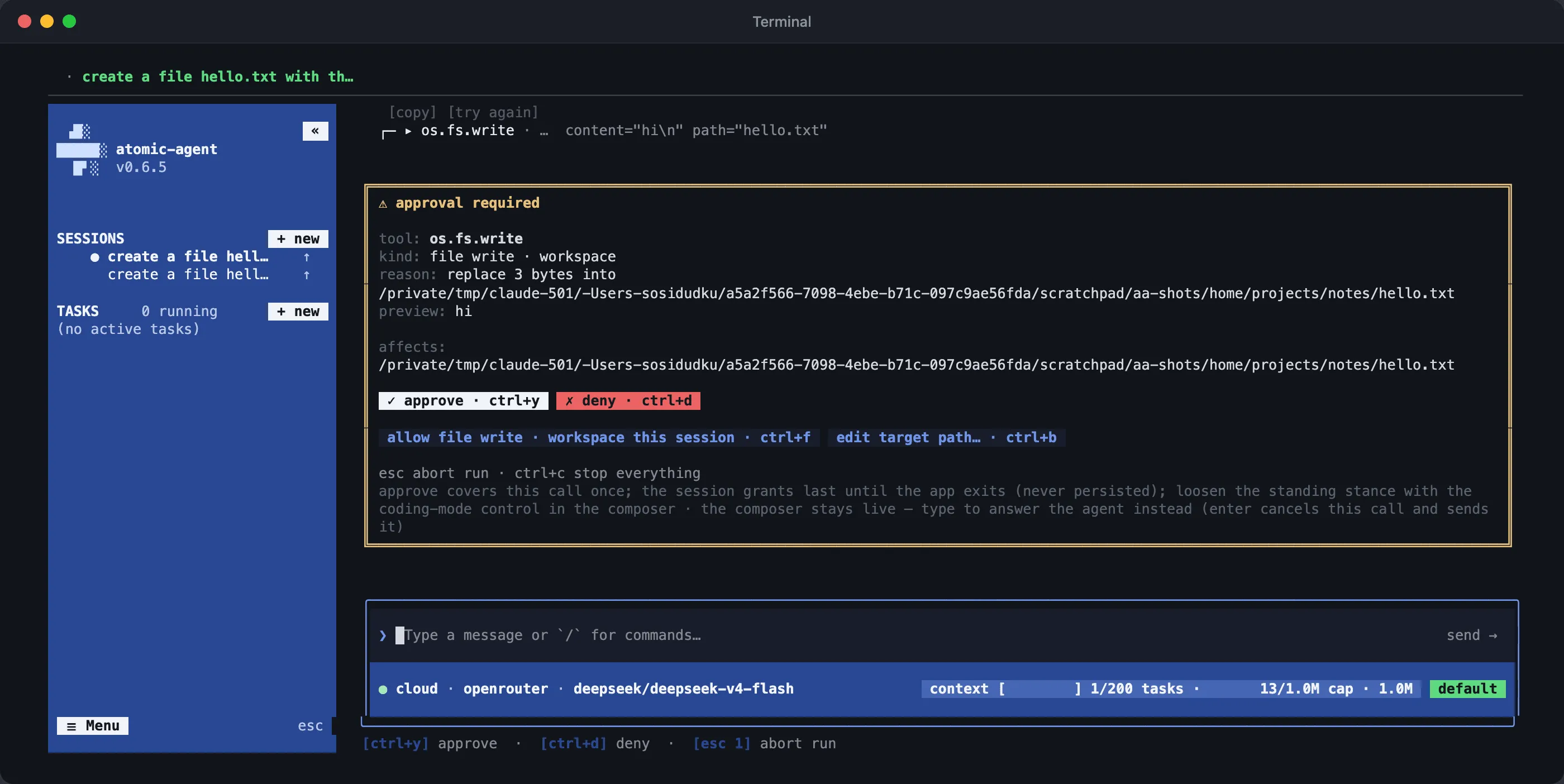
At the default approval level, Atomic Agent v0.6.5 stops before writing a file: approve once, deny, or allow that kind of action for the session. Captured in a test setup with a cloud model through OpenRouter; the same prompt appears with a local model.
Verdict: Choose it if you want every risky action approved, a local model managed for you, Telegram or Discord as your remote control, and your OpenClaw chat history and cron jobs carried over.
2. Hermes Agent: best for the biggest community and the deepest migration
Hermes Agent from Nous Research is a self-improving personal agent: it creates and refines its own skills, keeps persistent memory and searches past sessions. It is written in Python under MIT, has 249,835 stars and released v2026.9.24 on September 24, 2026.
- OpenClaw import:
hermes claw migrate, with--dry-run,--preset user-dataand--overwrite.hermes setupalso detects~/.openclawon its own. Per the README it imports SOUL.md, memories (MEMORY.md, USER.md), user skills, the command allowlist, messaging settings, allowlisted API keys, TTS assets and, with a flag, AGENTS.md. - Local models: through OpenAI-compatible servers: Ollama, LM Studio, vLLM and llama.cpp. The providers docs set a floor: “Hermes Agent requires at least 64,000 tokens of context for agent use with tools.”
- Channels: the README names Telegram, Discord, Slack, WhatsApp, Signal, email, Home Assistant and the CLI. The docs have setup pages for more than a dozen more, including Matrix, Microsoft Teams and iMessage through BlueBubbles.
- Security and approvals: commands are checked against a list of dangerous patterns, and a match needs your approval. The default
smartmode lets an auxiliary model judge risk, and a hardline blocklist cannot be bypassed. Docker and remote sandboxes are optional; the default backend is local. Skills from its hub are quarantined and scanned. - Telemetry: “Hermes Agent does not collect telemetry, usage data, or analytics,” per its FAQ.
Note: the 64K-context floor is enforced at startup, so small local setups get refused until you tune them. Approval also triggers only on commands that match a dangerous pattern; a command that matches none runs without asking.
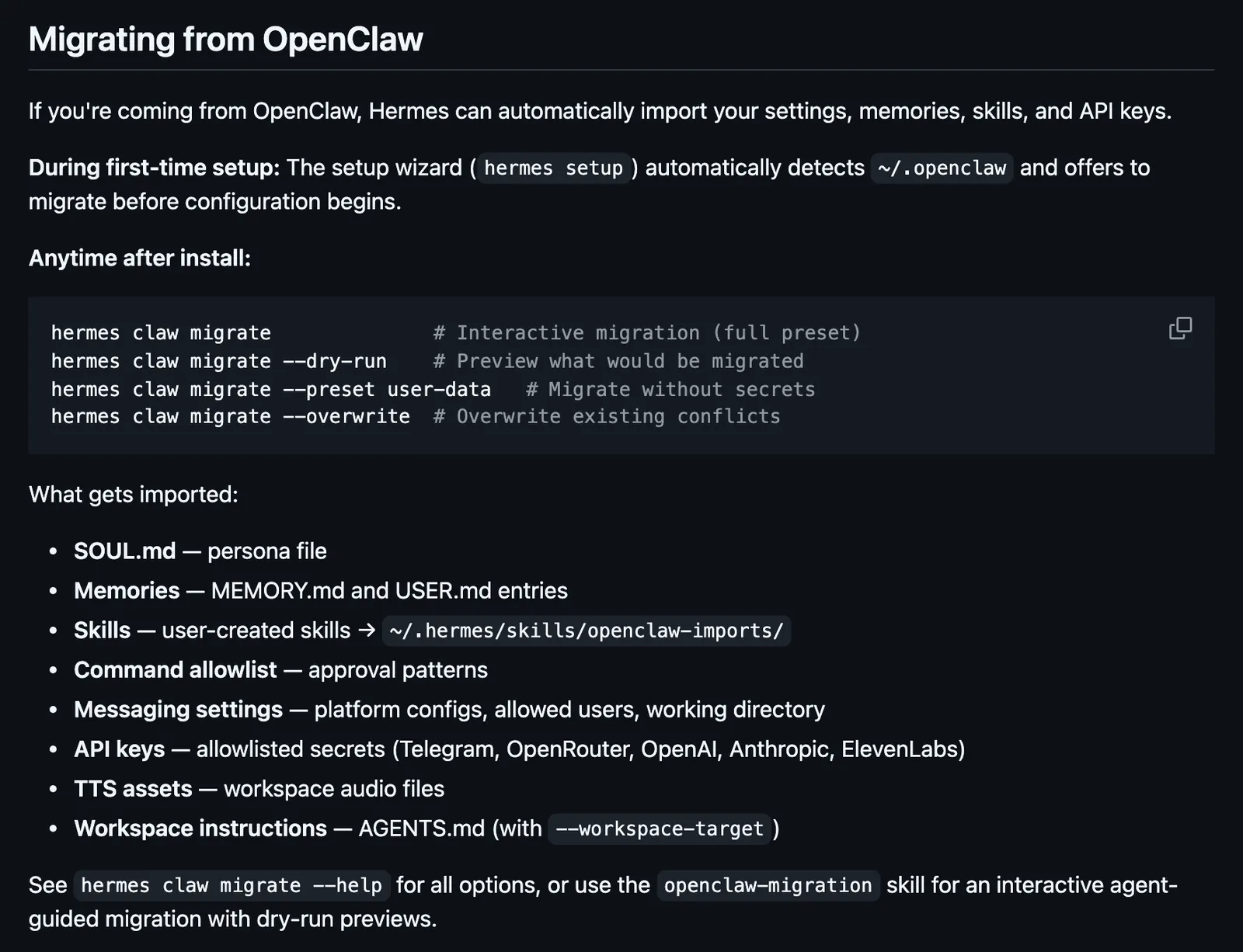
Hermes Agent documents a full OpenClaw migration. Source: NousResearch/hermes-agent README. We did not run it.
Verdict: Choose it if you want the largest open-source community, many channels and a migration that carries your skills, memory and messaging settings.
We compared Hermes, OpenClaw and Atomic Agent in more depth in Atomic Agent vs Hermes vs OpenClaw.
3. NanoClaw: best for container isolation
NanoClaw is a small TypeScript assistant built on Anthropic’s Claude Agent SDK, meant to be forked and customized through Claude Code. It is MIT-licensed, has 30,858 stars and released v2.4.0 on September 23, 2026. Its README puts the pitch plainly: “Agents run in their own Linux containers with filesystem isolation, not merely behind permission checks.”
- OpenClaw import: no CLI command. A Claude Code skill,
migrate-from-openclaw, walks you through it and extracts your identity, channel credentials, scheduled tasks, workspace markdown and OpenClaw skills, showing proposed changes before it applies them. - Local models: not in the core. An
/add-ollama-providerskill routes an agent group to Ollama, and any Claude-API-compatible endpoint works throughANTHROPIC_BASE_URL. - Channels: WhatsApp, Telegram, Discord, Slack, Microsoft Teams, iMessage, Matrix, Google Chat, Webex and more, each installed on demand with an
/add-<channel>skill. - Security and approvals: every agent group runs in its own Docker container and sees only mounted paths. Credentials stay outside the container behind a credential gateway, which injects them per request, enforces per-agent policies and can hold a request for human approval. Shell commands inside the container are not gated one by one.
- Telemetry: “The only thing it reports is anonymous setup diagnostics, and
NANOCLAW_NO_DIAGNOSTICS=1turns those off.”
Note: it is Claude-first by design. Its own Ollama doc says “For complex multi-step tasks requiring large context or high reliability, Claude is still ahead.” You also need Docker and Claude Code to set it up and add channels.
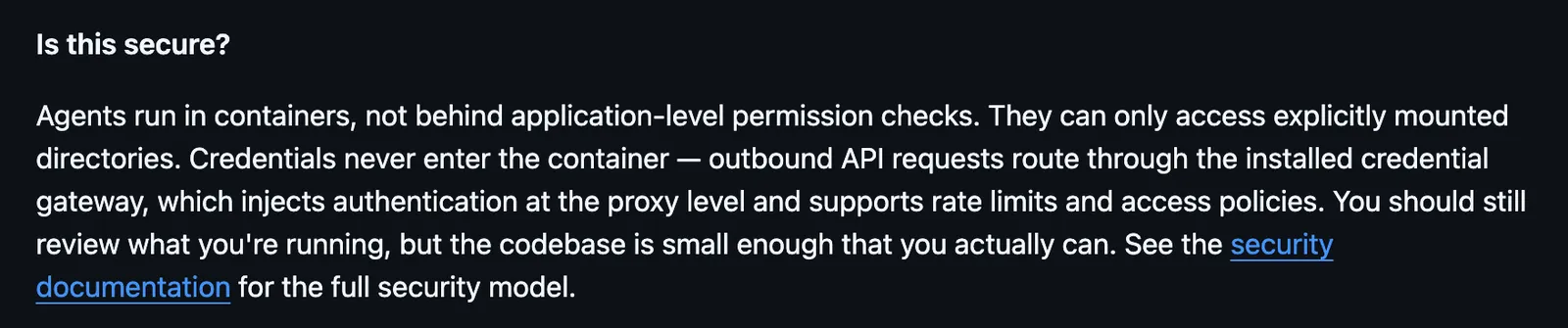
NanoClaw runs agents in containers. Source: nanocoai/nanoclaw README.
Verdict: Choose it if isolation matters more to you than anything else and you are happy to run Claude with Docker.
4. ZeroClaw: best for many channels in one Rust binary
ZeroClaw is a single Rust binary that connects to about 20 model providers and 30+ channels. The README says it is dual-licensed MIT or Apache 2.0. It has 32,908 stars and released v0.8.5 on September 5, 2026. Always use the zeroclaw-labs repo: stale forks with the same name exist.
- OpenClaw import:
zeroclaw migrate openclaw, with--source,--dry-runand--reindex. It imports memory only. Config, skills and channels are not part of it. - Local models: “Configure Anthropic, OpenAI, local Ollama, or any OpenAI-compatible endpoint,” per the README.
- Channels: the default build ships Telegram, Discord, email, webhooks and a few more; build features add WhatsApp, Matrix, Slack, Signal, iMessage, Mattermost and others, listed in its channels overview.
- Security and approvals: the default autonomy level is
supervised: low-risk tools run, medium-risk tools ask you (for example with Telegram buttons), and high-risk tools are blocked. It adds workspace boundaries, command policy and OS sandboxes such as Landlock, Bubblewrap, Seatbelt or Docker. - Telemetry: “No telemetry, no cloud tenancy, no license server,” per its docs.
Note: after the memory import you rebuild providers, channels and skills by hand. There is also a YOLO mode that skips the safety gates, so check your config before you expose it.
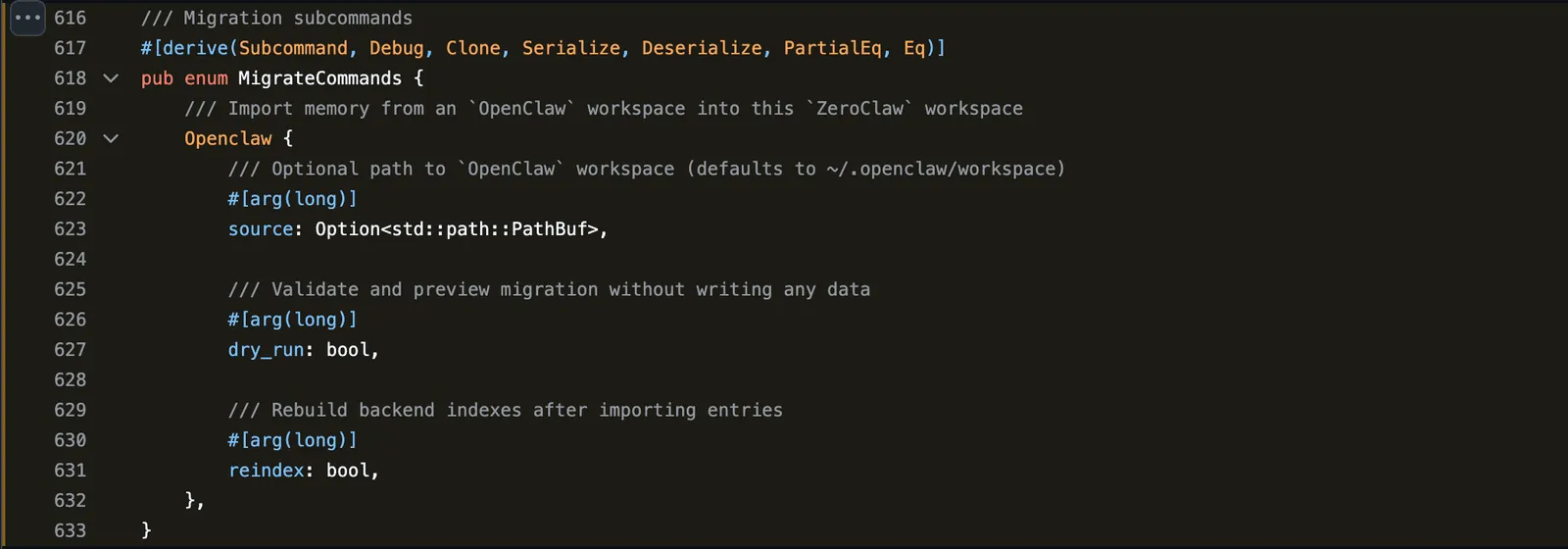
ZeroClaw’s OpenClaw migration is defined in code and imports memory only. Source: zeroclaw-labs/zeroclaw src/lib.rs.
Verdict: Choose it if you want broad channel coverage, supervised autonomy by default and a single binary to deploy.
5. Nanobot: best for a lightweight Python agent with OpenClaw-style skills
Nanobot from HKUDS is an ultra-lightweight self-hosted agent with a WebUI, terminal, chat apps, memory, MCP, cron and a Python SDK. It is MIT-licensed, has 48,649 stars and released v0.3.5 on September 15, 2026.
- OpenClaw import: none that we could find in the README, docs or code. Its built-in skills are “adapted from OpenClaw’s skill system,” so the format will look familiar.
- Local models: Ollama, vLLM, LM Studio or any OpenAI-compatible server.
- Channels: Telegram, Discord, WhatsApp, Slack, Signal, Matrix, email, Microsoft Teams, WeChat, Feishu, DingTalk, QQ and more.
- Security and approvals: a shell sandbox (bubblewrap on Linux, Seatbelt on macOS) and a workspace restriction exist, and both are off by default. We found no per-tool approval gate; DM pairing controls who can talk to the bot.
- Telemetry: we found no statement in the README or docs.
Note: hardening is your job. The security docs say “Neither backend restricts network access,” and on Windows commands run without an OS sandbox.
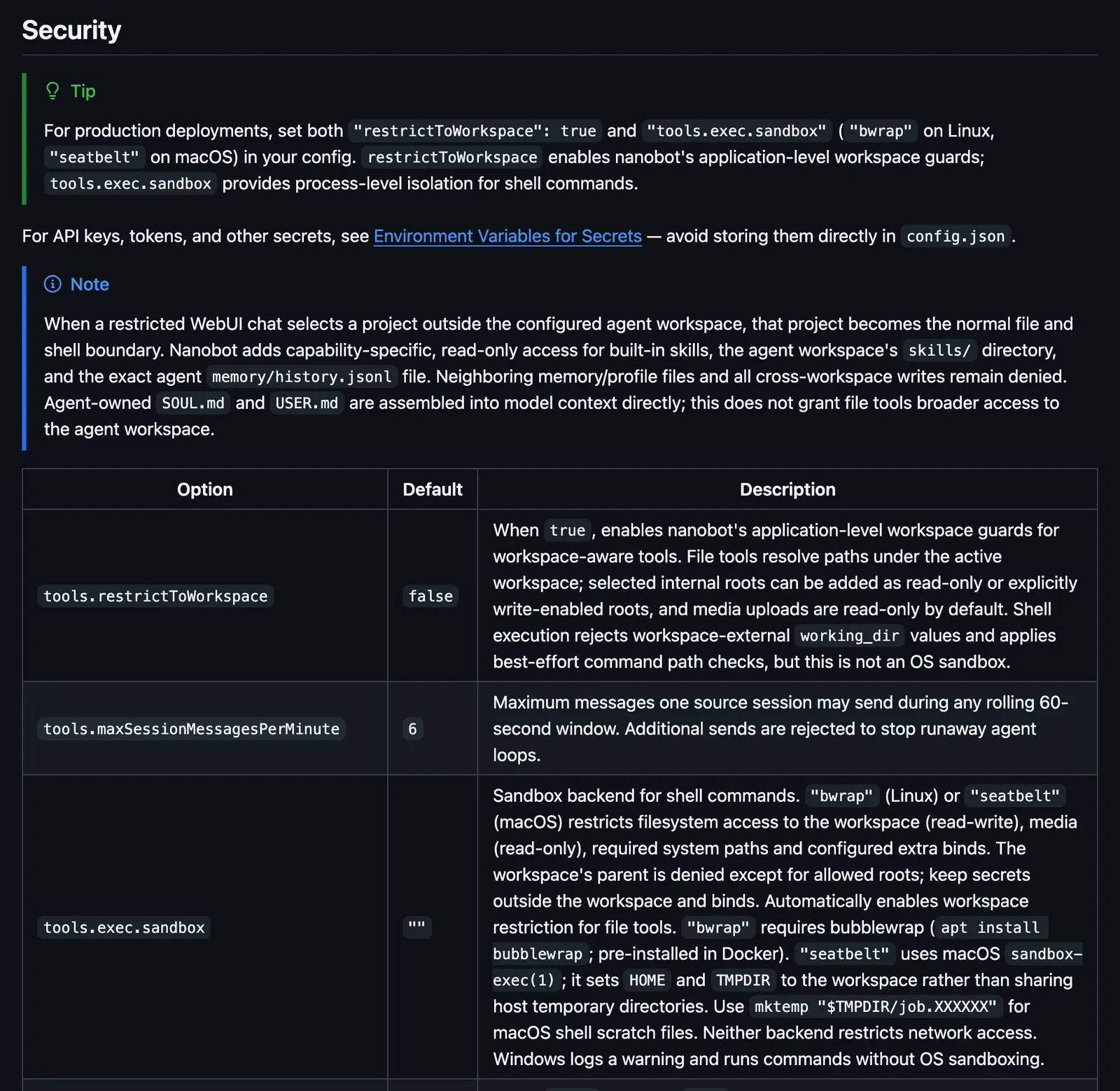
Nanobot’s workspace restriction and sandbox are off by default. Source: HKUDS/nanobot configuration docs.
Verdict: Choose it if you want a small Python codebase you can read in an afternoon and you will switch on the sandbox yourself.
6. Moltis: best for a one-command migration with sandboxing on
Moltis is a persistent personal agent server in one Rust binary, with a web UI, channels, voice, memory, MCP and sandboxed execution. It is MIT-licensed, has 2,877 stars and released 20260913.02 on September 14, 2026. Its README says: “Your keys never leave your machine. Every command runs in a sandboxed container, never on your host.” Its sandbox docs add one exception: with no container runtime installed, commands fall back to running on the host.
- OpenClaw import:
moltis import detect, thenmoltis import all(with--dry-run), or the OpenClaw Import step in onboarding and settings. It reads~/.openclawwithout changing it. Per the import docs it brings identity, provider keys, skills, memory, Telegram and Discord channel config, sessions, MCP servers, workspace files and multi-agent presets. It is the widest importer on this list. - Local models: built-in GGUF through llama.cpp and MLX, plus Ollama, LM Studio and custom OpenAI-compatible providers.
- Channels: Telegram, Signal, Microsoft Teams, Discord, Slack, WhatsApp, Matrix, Nostr, the web UI and a mobile PWA.
- Security and approvals: commands run inside Docker or Apple Container by default. Dangerous commands need approval (
on-missmode, also calledsmart, by default, withalwaysandneveroptions), and a blocklist always applies. Skills pass a trust gate, and you cannot enable an untrusted skill. - Telemetry: we found no telemetry statement in its docs. Its instrumentation docs say optional trace export is disabled by default.
Note: its local LLM docs say “Local models don’t support function/tool calling” for the built-in backend, which turns off file operations, shell commands and memory search. That statement covers the built-in GGUF and MLX path; Ollama or other OpenAI-compatible providers are a separate route. Its community is also small, at 2,877 stars.
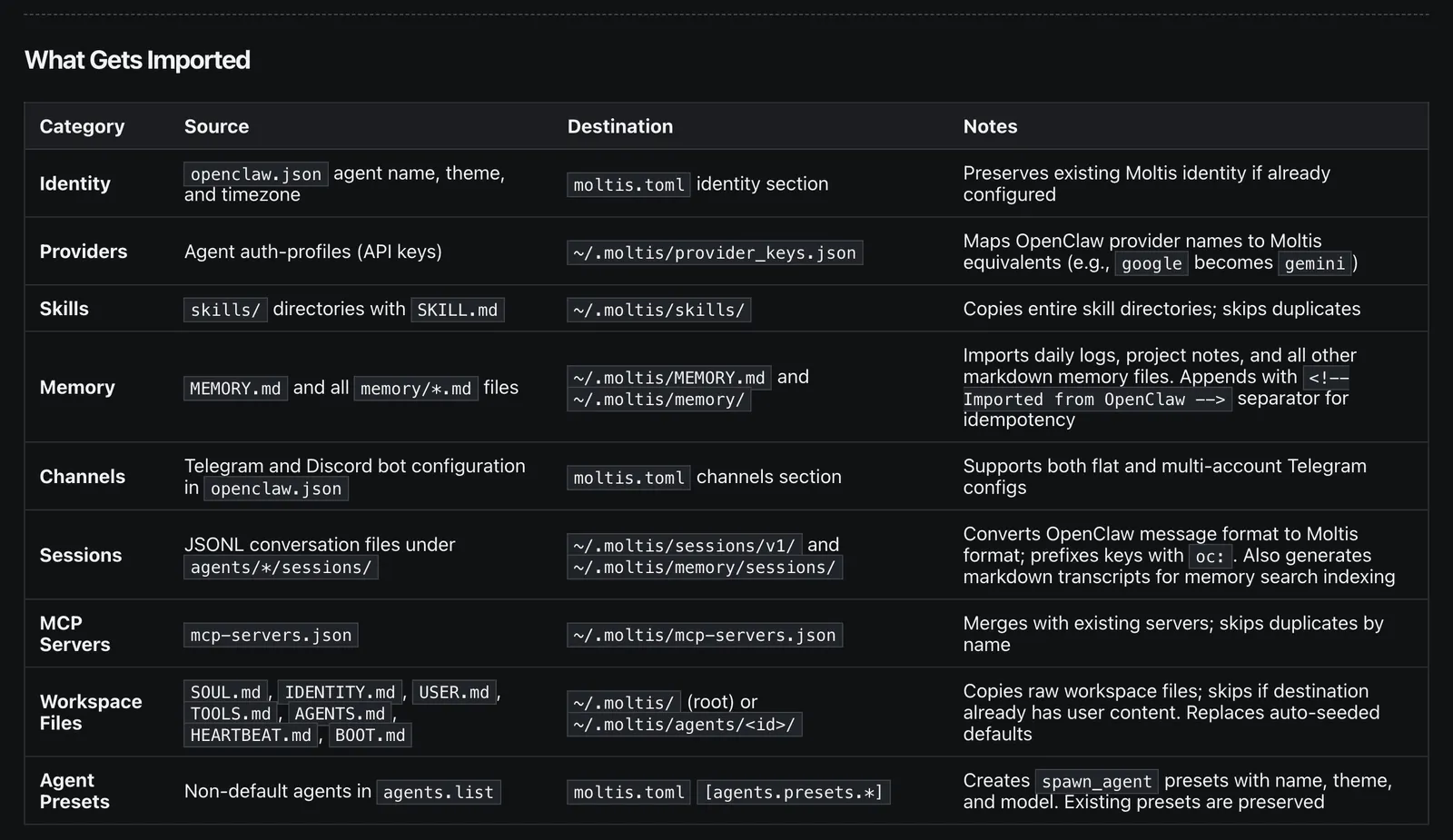
Moltis lists nine categories its OpenClaw import brings over. Source: Moltis docs. We did not run it.
Verdict: Choose it if you want most of your OpenClaw setup moved in one step and containers on by default.
7. IronClaw: best for WASM sandboxing with a narrow channel set
IronClaw from NEAR AI describes itself as “an Agent OS focused on privacy, security and extensibility.” It is a Rust reimplementation inspired by OpenClaw, dual-licensed MIT or Apache 2.0, with 12,634 stars. The latest stable release is 1.4.0 from August 28, 2026, with a 1.4.1 release candidate on September 24.
- OpenClaw import: we could not find one in the current code. A March 2026 pull request added OpenClaw memory, history and settings import, but that code went out with the v1 source tree in July, and current main has no such command. It does parse OpenClaw’s
SKILL.mdskill format. - Local models: an
ollamaprovider for local inference and anopenai_compatibleprovider for vLLM, LiteLLM and LM Studio. - Channels: the channels docs list Slack and Telegram, plus a REPL, webhooks and a web gateway. Discord, Signal, WeChat and WeCom were in IronClaw v1 and are not part of the 1.0 release.
- Security and approvals: tools run in a WASM sandbox with capability-based permissions and an endpoint allowlist. Credentials are injected at the host boundary and checked for leaks, secrets are encrypted, every tool execution is logged, and jobs can run in Docker. Exec approvals appear in the TUI.
- Telemetry: “No telemetry, analytics, or data sharing,” per the README.
Note: two official channels is thin for an assistant you want to reach from your phone. The installer also asks you to pick a release tag by hand.
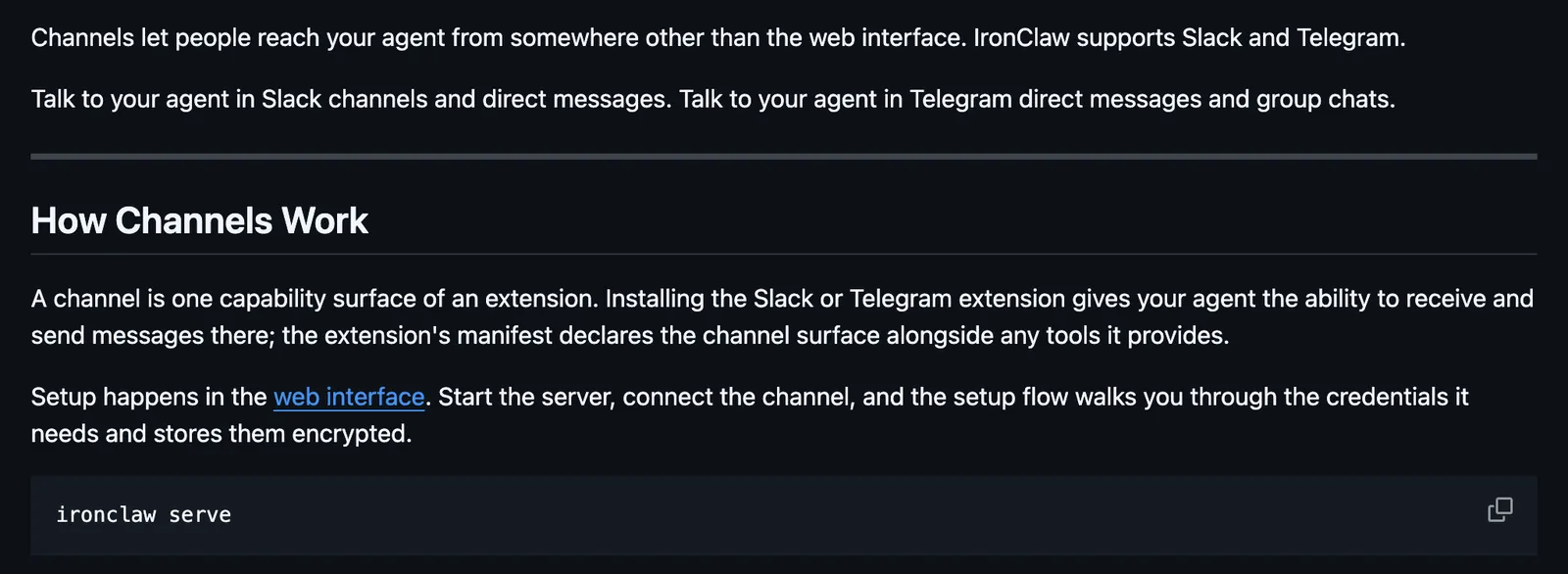
IronClaw’s docs list Slack and Telegram. Source: nearai/ironclaw docs.
Verdict: Choose it if you care most about sandboxed tools and an audit log, and Slack or Telegram covers you.
8. PicoClaw: best for tiny hardware
PicoClaw from Sipeed is a Go personal assistant written from scratch, built for RISC-V, ARM, MIPS and x86 boards. It is MIT-licensed, has 30,013 stars and last released v0.3.1 on July 3, 2026, 88 days before our check. Its last commit on main was August 19. The README claims it “Runs on $10 hardware with <10MB RAM” and adds that recent builds may use 10-20MB.
- OpenClaw import:
picoclaw migrate --from openclaw, with--dry-run,--config-only,--workspace-onlyand--force, reading~/.openclawby default. We did not verify item by item what it carries across. - Local models:
ollama/andvllm/model prefixes with no API key, plus LiteLLM. - Channels: Telegram, Discord, WhatsApp, Slack, Matrix, LINE, QQ, DingTalk, Feishu, MQTT and more; the README claims 19+.
- Security and approvals: file and exec tools are limited to the workspace by default, and exec blocks a list of dangerous commands even when that limit is off. Secrets live in a separate file, and approval hooks exist. Skills install from ClawHub, and we found no vetting step of its own.
- Telemetry: we found no statement in the README or code.
Note: its own README says “PicoClaw is in early rapid development. There may be unresolved security issues. Do not deploy to production before v1.0.” Releases have also slowed; it drops out of our 90-day window in early October.
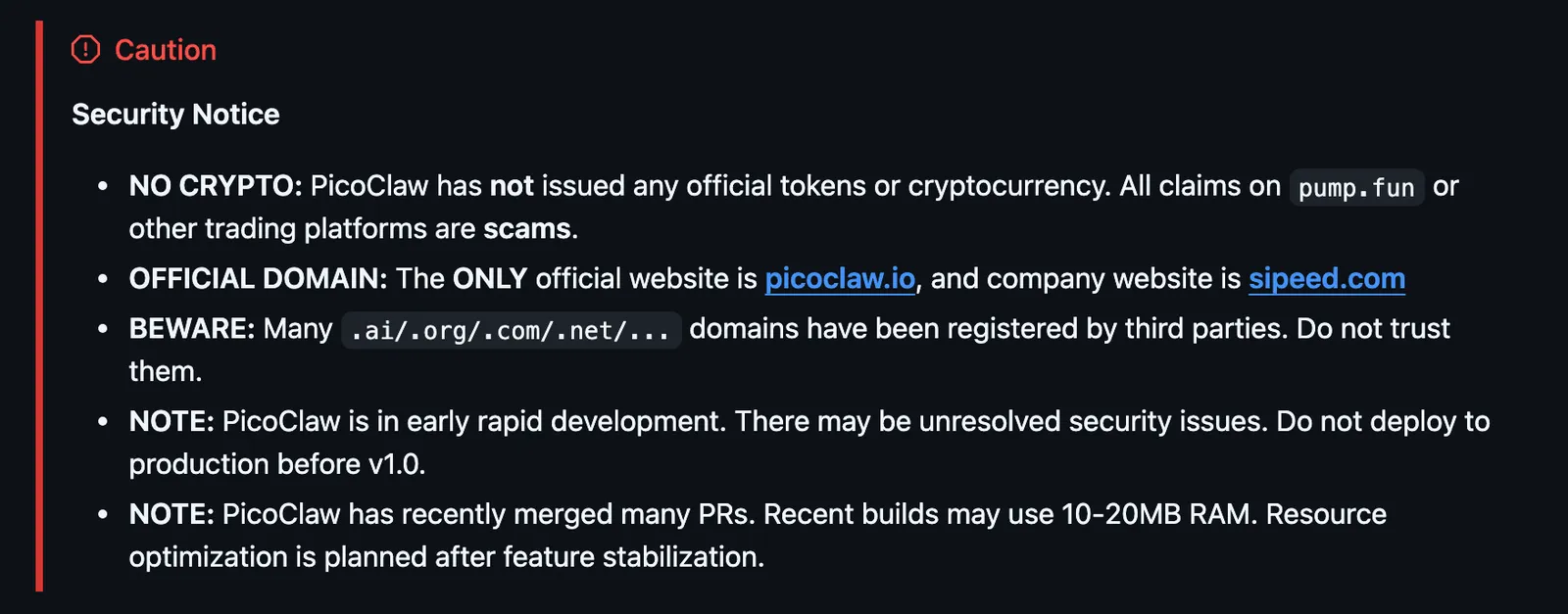
PicoClaw’s own pre-1.0 security notice. Source: sipeed/picoclaw README.
Verdict: Choose it if you want an assistant on a $10 board and accept a pre-1.0 project.
OpenClaw alternatives compared
Three numbers set the tools apart. Hermes has 249,835 stars, more than the other seven combined. Moltis imports the most from OpenClaw, and ZeroClaw has the most channels at 30+. Atomic Agent and IronClaw have the fewest channels, two each.
| Tool | License | Latest release | Stars (Sep 29) | OpenClaw import | Local models | Channels | Sandbox / approvals | Telemetry |
|---|---|---|---|---|---|---|---|---|
| OpenClaw (baseline) | MIT | 2026.9.6, Sep 23 | 390,749 | n/a | Yes | 29 | Host by default, sandbox optional; security audit | Daily version check; feature stats opt-in |
| Atomic Agent (ours) | MIT | v0.6.5, Sep 24 | 2,519 | Yes: chat history, cron jobs | Managed llama.cpp, Ollama, LM Studio | 2 (Telegram, Discord) | Approval on every gated action by default; no sandbox | On by default, one setting off |
| Hermes Agent | MIT | v2026.9.24, Sep 24 | 249,835 | Yes: memories, skills, messaging settings, allowlisted keys | OpenAI-compatible (64K context minimum) | 8 in README, more in docs | Approval on dangerous patterns; Docker optional | None, per FAQ |
| NanoClaw | MIT | v2.4.0, Sep 23 | 30,858 | Guided skill: identity, channel credentials, tasks, workspace, skills | Ollama via add-on skill | 10+ on demand | Docker container per agent group | Setup diagnostics, env var off |
| ZeroClaw | MIT or Apache 2.0 | v0.8.5, Sep 5 | 32,908 | Yes: memory only | Ollama, OpenAI-compatible | 30+ | Supervised by default; OS sandboxes | None, per docs |
| Nanobot | MIT | v0.3.5, Sep 15 | 48,649 | None found | Ollama, vLLM, LM Studio | 15+ | Sandbox opt-in, off by default | No statement found |
| Moltis | MIT | 20260913.02, Sep 14 | 2,877 | Yes: keys, skills, memory, sessions, MCP, channel config | Built-in GGUF/MLX (no tools), Ollama | 8+ | Containers by default; approvals | No statement found; trace export off by default |
| IronClaw | MIT or Apache 2.0 | 1.4.0, Aug 28 | 12,634 | None in current code | Ollama, OpenAI-compatible | 2 (Slack, Telegram) | WASM sandbox; TUI approvals | None, per README |
| PicoClaw | MIT | v0.3.1, Jul 3 | 30,013 | Yes: migrate --from openclaw | Ollama, vLLM | 19+ | Workspace-restricted by default | No statement found |
Channel counts come from each project’s README or docs and include optional add-ons.
Migrating from OpenClaw: what actually moves
No alternative moves everything. Moltis comes closest: its importer covers sessions, memory, skills, keys, MCP servers and Telegram or Discord config. Hermes moves memory, skills, messaging settings and keys. Atomic Agent moves chat history and scheduled jobs. ZeroClaw moves memory. Nanobot and IronClaw currently have no importer.
| What you have in OpenClaw | Atomic Agent | Hermes | NanoClaw | ZeroClaw | Moltis | PicoClaw |
|---|---|---|---|---|---|---|
| Command | import openclaw | claw migrate | migrate-from-openclaw skill | migrate openclaw | import all | migrate --from openclaw |
| Chat history (sessions) | Yes | Not listed | Not listed | No | Yes | Not verified |
| Scheduled jobs (cron) | Yes | Not listed | Yes | No | Not listed | Not verified |
| Memory and workspace files | No | Yes | Yes | Yes (memory) | Yes | Workspace flag exists |
| Skills | No, reinstall from ClawHub | Yes | Yes | No | Yes | Not verified |
| Channel config | No | Yes | Yes (credentials) | No | Telegram, Discord | Not verified |
| Provider API keys | No | Allowlisted keys | Not listed | No | Yes | Not verified |
| MCP servers | No | Not listed | Not listed | No | Yes | Not verified |
| Preview before writing | --dry-run | --dry-run | Shows changes first | --dry-run | --dry-run | --dry-run |
“Not listed” means the project’s docs do not mention that item. It may or may not move.
Our own dry run shows what the preview looks like. We built a small sample OpenClaw folder in a test home directory, with two chat sessions and one scheduled job in the same file format OpenClaw uses, and ran atomic-agent import openclaw --dry-run on Atomic Agent v0.6.5. It selected sessions and cron, listed each item, printed migrated=3 skipped=0 conflict=0 error=0 and ended with “Dry-run: nothing was written.” On a real Mac with OpenClaw installed but no sessions yet, the same command reported both items as skipped. Run the dry run of whichever tool you pick first, and read the report before you apply it.
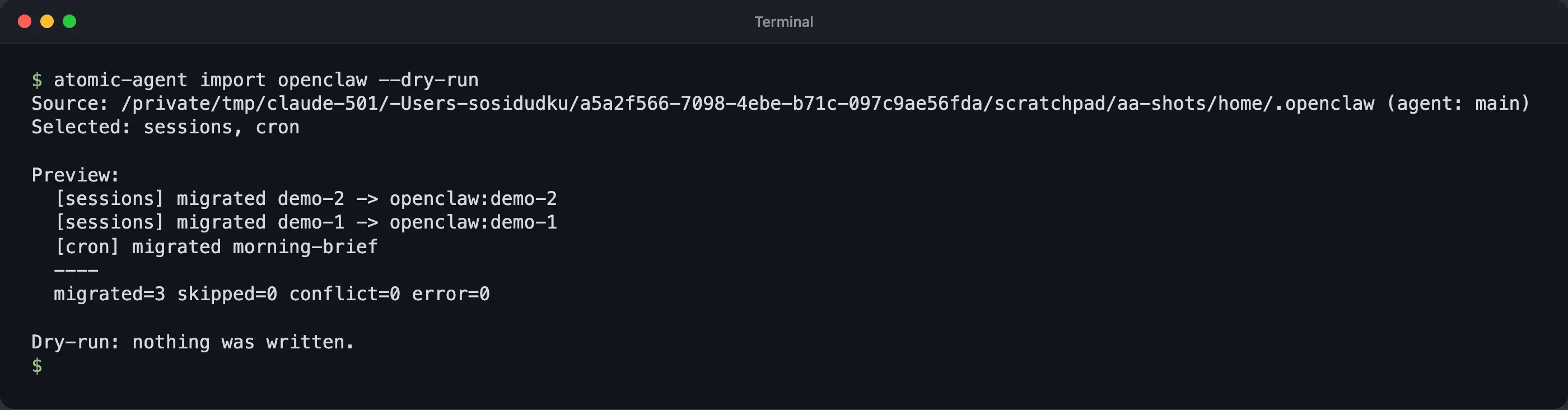
Atomic Agent v0.6.5 previewing an OpenClaw import: chat sessions and scheduled jobs only, nothing written. Shown with sample OpenClaw data in a test home folder, which is why the path is long.
Keep ~/.openclaw untouched until the new agent works. Where an importer skips API keys, re-add them by hand, and rotate them if your OpenClaw gateway was ever reachable from the internet.
If you’d rather have it managed
Some people leaving OpenClaw want to stop running an agent at all. Other lists point them to hosted assistants such as Claude Cowork, Manus and Kimi Claw. We did not check those, since none of them is something you install and run yourself.
When to stay on OpenClaw
Stay if you rely on its reach. OpenClaw’s site lists 29 channels, its docs cover local models through Ollama, LM Studio and vLLM, and it has by far the largest ecosystem at 390,749 stars. It has also hardened since February: CVE-2026-25253 is fixed, and there is a built-in audit command and VirusTotal scanning on ClawHub.
If you stay, use what it gives you. Run openclaw security audit with --deep and --fix, keep it updated, and configure sandboxing, since tools otherwise run on your host. On skills, OpenClaw’s VirusTotal partnership scans every published skill and rescans active skills daily, and openclaw skills verify shows the status. OpenClaw’s own docs are candid about the limit: “a pending or stale scan can allow installation with a warning; installation is not proof that every scan completed.” Read a skill before you install it.
For fairness on telemetry: OpenClaw’s README says that “by default OpenClaw itself phones home for nothing but a daily version check, anonymous feature statistics are opt-in.” That is a lighter default than Atomic Agent’s.
Frequently asked questions
Which one should you pick?
Start from what you would miss most. If it is the community, your skills and memory, try Hermes Agent with hermes claw migrate --dry-run. If it is isolation, NanoClaw and Moltis put commands in containers. If you want your whole setup moved at once, Moltis has the widest importer. If you live in many chat apps, ZeroClaw covers 30+.
If you want approvals on every gated action, a local model the agent runs for you, and Telegram or Discord as the remote control, try Atomic Agent. Run atomic-agent import openclaw --dry-run to see what would come over: your chat history and cron jobs, nothing else. If a local agent is new to you, what a local AI agent is explains the idea in plain terms.
And if none of these covers the channels you depend on, staying on a patched, audited OpenClaw is a reasonable answer.
Release dates, versions, licenses and star counts were checked against the GitHub API and each project’s documentation on September 29, 2026. We did not benchmark these agents; the only things we ran were Atomic Agent’s OpenClaw import in dry-run mode, on sample data, and one approval prompt.