

 Nadya Dudka
 Andrew Dyuzhov
Almost every popular AI agent is free to download. The model is what costs money. An agent is the program that plans and uses tools; the model is the brain it calls. Pay a provider per token and a busy agent gets expensive fast. Run the model on your own computer, or use free cloud models within their limits, and the bill is $0.
We checked 9 free AI agents on 25 November 2026: what is free, the catch, and who each one suits. Every price and limit links to the vendor’s own page.
These are agents that work on your computer: files, code, apps and chats. Looking for a no-code builder that wires up web automations, like Zapier Agents or n8n? That is a different kind of tool, with its own free tiers, and it is not covered here.
Free AI agents at a glance
| Agent | Type | License | Free models | Local models | The catch |
|---|---|---|---|---|---|
| Atomic Agent | Desktop, terminal, Telegram | MIT | Local, plus free OpenRouter models | Built in, picks one for you | Local models are slower than the cloud |
| OpenClaw | Personal assistant in chat apps | MIT | Bring your own | Yes (Ollama) | You pay your model provider |
| Hermes Agent | Terminal, desktop, chat apps | MIT | Free models on Nous Portal Free | Yes | Hosted tools need a paid plan |
| OpenCode | Terminal coding agent | MIT | Yes, for a limited time | Yes | Some free models may train on your data |
| Goose | Desktop and terminal | Apache-2.0 | Bring your own | Yes | You pay your model provider |
| Cline | VS Code coding agent | Apache-2.0 | Bring your own | Yes | You pay for inference |
| Kilo Code | VS Code, JetBrains, terminal | MIT | ”Auto Free” where available | Yes | Free models not listed |
| AnythingLLM | Desktop app with agents | MIT | Bring your own | Built in | Cloud plans from $50 a month |
| OpenHands | Self-hosted coding agent | MIT | Bring your own | Yes | Self-hosting takes setup |
Licenses and activity from the GitHub API, prices from each vendor’s site, checked 25 Nov 2026. Every project here released an update within the last six weeks.
How to get a $0 AI agent setup
There are two ways to pay nothing:
- A local model on your computer. Free forever, no daily cap, works without internet. Needs memory: 8 GB runs a small model, 16 GB a comfortable one. Slower than the cloud.
- Free cloud models. Fast and nothing to download, but capped. On OpenRouter, free models allow 50 requests a day, or 1,000 a day once you have bought at least 10 credits. An agent uses several requests per task, so 50 goes quickly.
The agents below support one or both.
1. Atomic Agent: free with local models, picks one for you
Atomic Agent is an open-source (MIT) agent for your desktop, terminal and Telegram. It edits files, runs commands, uses git, browses the web and remembers across sessions, and it asks before risky actions.
What is free: all of it with a local model. Atomic Agent downloads and runs the model for you, so there is no Ollama or LM Studio to set up. atomic-agent models recommend reads your RAM and disk and picks a model that fits. Want the cloud? atomic-agent models search free --provider openrouter --refresh lists free OpenRouter models you can use with a free OpenRouter key.
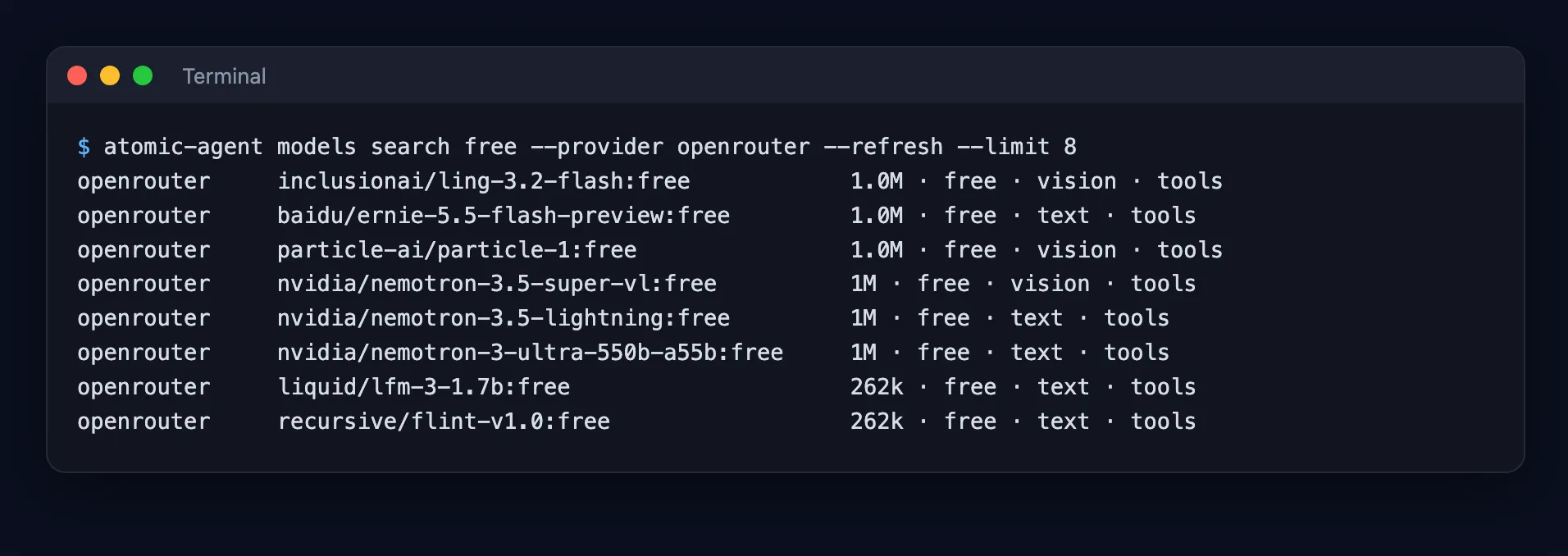
Free OpenRouter models listed by Atomic Agent v0.8.0 on 25 Nov 2026. The list changes often.
Proof it runs at $0: on a 16 GB MacBook Air, with the free qwen-3.5-9b model and Offline mode on, it merged three notes into a checklist and committed it to git in 6.5 minutes, with zero connections outside the laptop. Full test and setup.
The catch: a local model on a laptop is slower than a cloud model (about 16 tokens per second on that Air), so it suits work you hand over and come back to. Anonymous usage analytics is on by default; turn it off with analytics.enabled: false.
Best for: anyone who wants an agent with no API key, no bill and no daily limit.
curl -fsSL https://atomicagent.io/install | shOr download the desktop app for Mac, Windows or Linux.
2. OpenClaw: free personal assistant in your chat apps
OpenClaw is an open-source (MIT) assistant you talk to from WhatsApp, Telegram, Discord, Slack, iMessage and more. Its site lists 29 channels. It handles inbox, calendar and everyday tasks.
What is free: everything. The site says there is no subscription and no hosted tier; the OpenClaw Foundation runs the project. You bring the model: a paid provider, a subscription or a local model through Ollama.
The catch: there are no free models included, so unless you run one locally, you pay a provider.
Best for: a personal assistant you message from your phone. Comparing it with others? See OpenClaw alternatives.
3. Hermes Agent: free agent that writes its own skills
Hermes Agent from Nous Research is an open-source (MIT) agent with memory that writes its own skills. It runs in the terminal, as a desktop app, and in Telegram, Discord, Slack and other apps.
What is free: the agent, plus the Nous Portal Free plan ($0, pay as you go, free models only). It also works with 30+ providers and with local models through Ollama, llama.cpp, LM Studio and others (providers list).
The catch: hosted tools and the cloud agent need a paid plan, from $20 a month.
Best for: people who want an agent that learns their workflows. Alternatives: Hermes Agent alternatives.
4. OpenCode: free coding agent with free cloud models
OpenCode is an open-source (MIT) coding agent for the terminal, desktop and mobile.
What is free: the app, and a set of free models listed on the Zen page “for a limited time”. It also works with 200+ providers and local models.
The catch: the Zen page says several free models may use your data to improve the model, so keep private code away from those. The free list can change. Paid OpenCode Go starts at $10 a month.
Best for: coding in the terminal for free, right now. More: OpenCode vs Claude Code.
5. Goose: free general-purpose agent
Goose is an open-source (Apache-2.0) agent for research, writing and automation as well as code, with a desktop app and a terminal. It now sits in the Agentic AI Foundation at the Linux Foundation.
What is free: the app. It works with 85+ providers, including OpenRouter, and can run local models directly.
The catch: no free models of its own, so you pay a provider unless you run locally.
Best for: a general desktop agent that is not only for developers.
6. Cline: free coding agent in VS Code
Cline is an open-source (Apache-2.0) coding agent that lives in VS Code.
What is free: the extension, which its pricing page calls “completely free for individual developers”. You pay only for inference, with your own key or at cost through Cline, or nothing with a local model.
The catch: no free models named on the pricing page.
Best for: developers who want an agent inside VS Code.
7. Kilo Code: free coding agent for VS Code and JetBrains
Kilo Code is an open-source (MIT) coding agent for VS Code, JetBrains and the terminal.
What is free: the extensions, with no platform fee. “Auto Free” routes to free models through Kilo Gateway “where available”. Local models work through Ollama or LM Studio with no plan.
The catch: the free models are not listed, and buying gateway credits adds a 5% fee. Teams costs $15 per user a month.
Best for: JetBrains users, who have fewer free options.
8. AnythingLLM: free desktop app with agents
AnythingLLM is an open-source (MIT) all-in-one AI app with custom agents, a no-code agent builder, MCP, web browsing and scheduled tasks.
What is free: the desktop app for Mac, Windows and Linux, and self-hosting with Docker. It has a built-in local model engine and also works with Ollama and LM Studio.
The catch: the hosted cloud plans cost $50 or $99 a month. Telemetry can be turned off in its privacy settings or with DISABLE_TELEMETRY (README).
Best for: chatting with your documents plus simple agents, in one app.
9. OpenHands: free self-hosted coding agent
OpenHands is an open-source (MIT) coding agent you can host yourself.
What is free: self-hosting, with your own key or a local model.
The catch: self-hosting takes setup, and the hosted Teams plan is $500 a month for 10 users.
Best for: teams that want a coding agent on their own servers.
Not on the list, and why
- ChatGPT agent: not free. OpenAI’s help page says agent mode is for paid plans only and that ChatGPT agent has been replaced by ChatGPT Work.
- Gemini CLI: still open source, but its README says free individual access moved to Antigravity CLI on 18 June 2026. Google has not published Antigravity CLI’s free limits.
- Roo Code: archived on GitHub; last update May 2026.
- Continue: its README says it is no longer maintained and is read-only.
- Aider: no release since August 2025.
Which free AI agent should you pick?
- No budget at all, no daily limits, works offline: Atomic Agent with a local model.
- Free cloud models in the terminal today: OpenCode, keeping private code off the models that train on data.
- Coding inside your editor: Cline (VS Code) or Kilo Code (VS Code and JetBrains).
- An assistant in your chat apps: OpenClaw or Hermes Agent.
- Documents plus agents in one app: AnythingLLM.
Try the $0 setup: download Atomic Agent, run atomic-agent models recommend, and it picks a free model your computer can run. No API key, no account, no bill.